
How to Build a Better Local Business Directory - Webinar Recap for Chambers, Main Streets, and Tourism Organizations (Updated)

Your business directory should be more than a list of names, addresses, and phone numbers.
Whether you’re a Chamber, Main Street, Tourism organization, local nonprofit, or municipality, a strong directory can help people discover local businesses, support referrals, improve visibility, and keep your website more useful.
In this webinar recap, we’ll walk through what makes a local business directory more valuable, what you can improve right away, and where connected tools like Locable’s Self-Updating Local Business Directory make the ideal version much easier to maintain.
The goal is simple: turn your directory from a static list into a living local resource that helps people discover, support, and promote businesses across your community.
Prefer to watch the full session? Watch the webinar recording here, then use the recap below to review the key ideas and apply them to your own directory.
In the webinar, we covered:
- Key elements of a good directory, plus common mistakes to avoid
- How to make listings more useful for locals, visitors, members, and partners
- Ways to fill and maintain your directory with less staff time
- How promotion, distribution, and Local Connections™ can help directory content get seen
Why Most Local Business Directories Fall Short
Most directories start with good intentions, but many end up as static lists that are hard to keep useful.
A weak directory usually has a few common problems:
- Listings are incomplete or outdated
- Categories are confusing or too granular
- Profiles lack photos, logos, reviews, or useful descriptions
- The directory is hard to search or navigate
- Listings are disconnected from related events, jobs, offers, blog posts, and community pages
- Staff must manually chase businesses for updates
The painful truth: if your directory depends on every business remembering to submit updates, it will slowly decay.
A better directory works like a living local resource - useful to residents, visitors, businesses, members, partners, and your own team.
What a Useful Business Directory Should Include
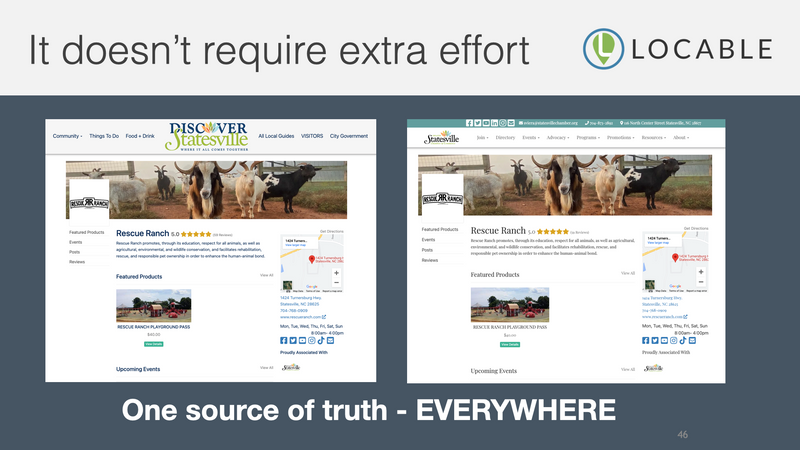
A useful directory does more than confirm that a business exists. It helps people decide where to go, who to contact, what to buy, and how to engage.
At a minimum, each listing should include:
- Business name, address, phone number, and website
- Clear categories that match how people actually search
- Hours, location details, and service area when relevant
- Logo, photos, and a short description
- Links to social media, online ordering, menus, booking pages, or other useful next steps
But the best business directories go further.
Strong listings can also include:
- Google reviews or other trust signals
- Related events, classes, sales, or promotions
- Job openings or volunteer opportunities
- Blog posts, announcements, or community stories
- Connections to nearby businesses, sponsors, partners, or resources
The goal is not to add more information for the sake of it. The goal is to make each listing more useful, easier to discover, and easier to keep current.
This is where most directory tools start to break down. They can store basic information, but they rarely help listings become richer, fresher, or more connected over time.
How to Make Your Directory More Helpful Right Away
These steps can improve almost any directory, but they also reveal an important truth: the better your directory gets, the more important your system becomes.
- Clean up categories so they match how people actually search
- Add photos, logos, and short descriptions where they’re missing
- Include links to menus, booking pages, online ordering, gift cards, or key services
- Highlight businesses with events, promotions, jobs, or community involvement
- Make sure listings work well on mobile
- Feature businesses in related blog posts, guides, emails, and social media
A few improvements can make a meaningful difference:
Start by reviewing your current listings through the eyes of a resident, visitor, new business owner, or potential customer. Ask: Would this listing help someone decide what to do next?
Still, there are practical improvements nearly anyone can make.
A strong directory starts with using the right tool for the job. If your current system only supports basic profile fields, you may hit limits quickly.
The Hard Part: Keeping Listings Fresh
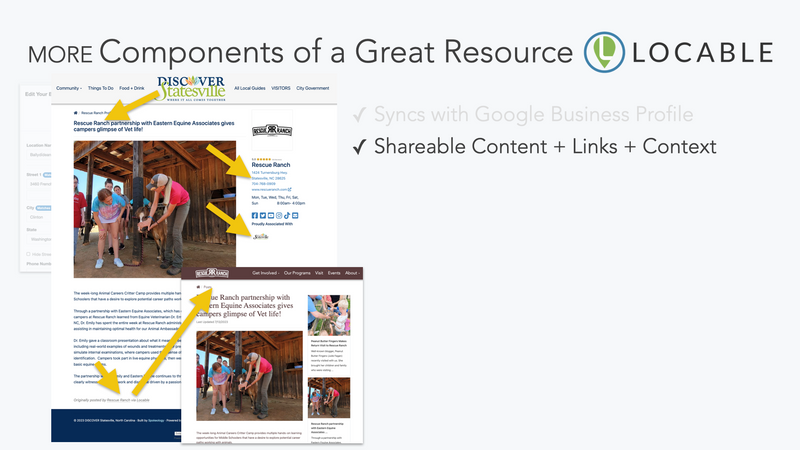
Improving listings is one thing. Keeping them current is where most directories break down.
Businesses change hours, update services, run promotions, host events, post jobs, and share updates regularly. If your directory depends on manual submissions or staff follow-up, it quickly falls behind.
That leads to a familiar cycle:
- Staff spends time chasing updates
- Businesses don’t respond consistently
- Listings become outdated
- Users stop trusting the directory
At that point, even a well-designed directory loses value.
A better approach is to reduce the dependence on manual updates.
Ideally, listings should:
- Improve over time, not degrade
- Pull in relevant updates without constant outreach
- Stay connected to what each business is already doing
- Support your website, emails, and marketing efforts automatically
This is where most traditional directory tools fall short. They store information, but they don’t help maintain it.
Be intentional with your categories. Categories are one of the most important parts of your directory, but they’re often overcomplicated.
- Use fewer, broader categories. If a category only has one or two businesses, it’s probably too specific. Broader groupings make it easier for users to browse and find options.
- Avoid “internal” or niche labels. Categories should reflect how residents and visitors think, not how your organization classifies members.
- Prioritize important categories. Don’t default to alphabetical order. Put high-interest categories like Dining, Shopping, and Things to Do first.
- Limit total category count. Too many choices create friction. A shorter, well-organized list is easier to scan and use.
- Allow businesses to appear in multiple categories. This improves discoverability without forcing overly specific categories.
A Clean Directory Is Only the Starting Point
A directory should be clean, organized, and easy to navigate. Categories, maps, photos, and simple profile pages all help people find what they need.
But appearance and basic usability are only the starting point.
A stronger directory should also help businesses get discovered, promoted, and connected to the rest of your local marketing.
Ask:
- Can listings include enough detail to help people choose where to go?
- Can businesses add photos, updates, events, jobs, offers, or announcements?
- Can directory content support email newsletters, social media, search visibility, and related website pages?
- Can businesses and community partners help promote each other?
- Can the directory stay fresh without becoming another staff maintenance project?
A directory can look good and still leave a lot of value on the table.
Build a Directory That Does More Than List Businesses
A clean, accurate directory is a good start. But the real opportunity is helping local businesses get found, promoted, and supported more often.
Start with what you can improve now: better categories, stronger descriptions, photos, useful links, and clearer next steps.
Then ask the bigger question: Can your directory stay fresh, support SEO and AI discovery, connect to events and updates, and help businesses promote each other without creating more work for your team?
If not, it may be time to explore a better tool for the job.
Locable’s Self-Updating Local Business Directory helps Chambers, Main Streets, Tourism organizations, nonprofits, and municipalities turn static listings into connected local visibility through richer profiles, easier updates, content support, and Local Connections™.
See how Locable can help improve your local business directory
5.0 (121 Reviews)
Locable
929 Winchester Hwy, #103
Fayetteville, TN 37334
www.locable.com